Skip to content
Save 30–70% vs. OEM | Ready-to-Install Chips
COMPLETE 5-COLOR PACKOEM CHIP INCLUDEDREMANUFACTURED

Epson Expression Premium XP-830 Ink Cartridges

What Ink Does the Epson Expression Premium XP-830 Use?

The Epson Expression Premium XP-830 uses Epson 410 or high-capacity 410XL ink cartridges. Starink offers a remanufactured Epson 410XL 5-Pack with Black, Photo Black, Cyan, Magenta, and Yellow. OEM Chip Included. Black yields up to 500 pages; Photo Black and each color yield up to 650 pages per cartridge.

Shop Epson 410XL Ink for the Expression Premium XP-830

Complete 5-PackOEM Chip IncludedRemanufactured

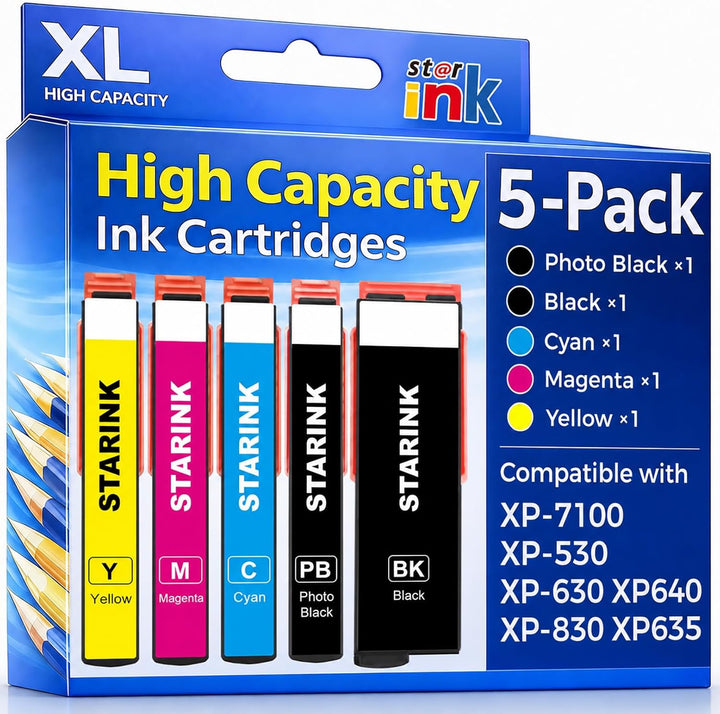
Starink Remanufactured Epson 410XL Ink Cartridges 5-Pack

Includes 1 × Black, 1 × Photo Black, 1 × Cyan, 1 × Magenta, and 1 × Yellow. Black yields up to 500 pages; Photo Black, Cyan, Magenta, and Yellow each yield up to 650 pages. Yields are per individual cartridge; actual output varies with use.

$32.99 USD$6.60 USD average per cartridgeIn Stock
Subscribe & Save 15% on Your First Order

Epson 410XL Ink Cartridge Compatibility

This page is for the Epson Expression Premium XP-830. The same Starink remanufactured Epson 410XL 5-Pack also fits the individual models below. Select a printer to visit its ink page.

Check the complete printer model and cartridge number before ordering. Printer names and trademarks identify compatibility. Starink is an independent remanufactured-cartridge brand and is not affiliated with Epson.

Epson 410XL Page Yields for the XP-830

The following Starink replacement-cartridge ratings apply to each individual cartridge:

CartridgePage Yield
Epson 410XL BlackUp to 500 pages
Epson 410XL Photo BlackUp to 650 pages
Epson 410XL CyanUp to 650 pages
Epson 410XL MagentaUp to 650 pages
Epson 410XL YellowUp to 650 pages

Page yield is measured per individual cartridge. Actual results vary with page content, printer settings, print frequency, maintenance cycles, and other usage conditions.

What's in the Epson 410XL 5-Pack?

  • 1 × Remanufactured Epson 410XL Black
  • 1 × Remanufactured Epson 410XL Photo Black
  • 1 × Remanufactured Epson 410XL Cyan
  • 1 × Remanufactured Epson 410XL Magenta
  • 1 × Remanufactured Epson 410XL Yellow

One cartridge for each of the five ink positions. OEM chips are included. Replace each cartridge in its matching color slot.

Starink Epson 410XL vs. Original Epson and Other Replacement Ink

What MattersStarink Epson 410XL Ready to InstallOriginal Epson 410XLOther Replacement Options
Product TypeRemanufactured ink cartridgesNew OEM ink cartridgesVaries by listing
Chip DescriptionOEM Chip Included; pre-installedOriginal Epson chipCheck the listing
Chip TransferNo transfer requiredNo transfer requiredMay vary
Page Yield Shown HereBlack up to 500 pages; Photo Black, Cyan, Magenta, and Yellow each up to 650 pagesCheck the current Epson listingCheck the seller’s stated yield
Customer ReviewsProduct reviews are currently unavailable.Varies by retailer and listingVaries by brand, seller, and listing

Starink page yields are per individual cartridge; actual output varies with use. For other products, check the exact listing for XP-830 compatibility, pack contents, chip details, and stated yields.

OEM Chip Included

Each Starink remanufactured Epson 410XL cartridge includes an OEM chip, already installed, so no chip transfer is required.

The chip supports communication with the listed compatible printers. If a cartridge message appears, check installation and the exact printer message using the troubleshooting guidance below.

Black and Photo Black: Two Separate Cartridges

The XP-830 has separate Black and Photo Black ink positions. This complete 5-Pack includes one of each, plus Cyan, Magenta, and Yellow.

Black and Photo Black are distinct cartridges. Match the label on the replacement cartridge to the correct printer slot.

Why Choose Starink Epson 410XL for the XP-830?

Complete Five-Color Pack

Black, Photo Black, Cyan, Magenta, and Yellow are all included in the 5-Pack.

OEM Chip Included

The included OEM chip is already installed on each remanufactured cartridge.

High-Yield Replacement

Black yields up to 500 pages; Photo Black and each color yield up to 650 pages per cartridge.

XP-830 Firmware and Cartridge Recognition

If your XP-830 displays a cartridge warning, check the cartridge family, matching color slot, protective material, and cartridge seating. Record the exact message and, if relevant, whether it appeared after a firmware update.

OEM Chip Included does not mean compatibility with every firmware version is guaranteed. For information about managing automatic updates, review the firmware settings guide.

Ink for XP-830 Home Documents and Photo Projects

Use your Expression Premium XP-830 for everyday documents, schoolwork, and photo projects. Choose paper types and print settings supported by your printer.

Everyday Documents

  • Homework and study notes
  • Home-office documents
  • Forms and everyday correspondence

Photos and Color Projects

  • Family photos
  • Color handouts and charts
  • Creative projects

Installing Epson 410XL Ink in the XP-830

Quick Replacement Steps

  1. Confirm the printer is an Epson Expression Premium XP-830 and the replacement cartridge is Epson 410XL.
  2. Follow the printer’s on-screen cartridge-replacement instructions. Open the access area and wait until the carriage stops moving.
  3. Remove the cartridge that needs replacement.
  4. Prepare the matching color cartridge and remove protective materials as directed by its instructions. Avoid touching the chip contacts or ink outlet.
  5. Insert the cartridge securely in its matching slot. Keep Black and Photo Black in their separate positions.
  6. Close the access area and allow the printer to complete ink charging. Follow any test-print or nozzle-check prompts.

If a Cartridge Is Not Recognized

Recheck the cartridge number, color slot, protective material, and seating. Record any persistent error message. If the issue followed an update, also note the firmware version and when the update occurred.

Epson Expression Premium XP-830 Ink Cartridge FAQs

What ink does the Epson Expression Premium XP-830 use?

The Epson Expression Premium XP-830 uses Epson 410 or high-capacity Epson 410XL ink cartridges. Starink offers a remanufactured Epson 410XL 5-Pack with Black, Photo Black, Cyan, Magenta, and Yellow.

Is the Starink Epson 410XL 5-Pack compatible with the XP-830?

Yes. The Starink remanufactured Epson 410XL 5-Pack is compatible with the Epson Expression Premium XP-830. Check the complete printer model and cartridge number before ordering.

What is included in the Epson 410XL 5-Pack?

The pack contains five cartridges: one Black, one Photo Black, one Cyan, one Magenta, and one Yellow. It is a complete five-color replacement set.

Is Photo Black included, and is it the same as Black?

Photo Black is included. Black and Photo Black are separate cartridges for different ink positions in the XP-830. Install each cartridge in its matching labeled slot.

How many pages does the Starink Epson 410XL Black cartridge print?

The Starink replacement Epson 410XL Black cartridge yields up to 500 pages per individual cartridge. Actual results vary with page content, printer settings, print frequency, maintenance cycles, and other usage conditions.

What are the page yields for Photo Black, Cyan, Magenta, and Yellow?

The Starink replacement Epson 410XL Photo Black, Cyan, Magenta, and Yellow cartridges each yield up to 650 pages per individual cartridge. Actual output varies with use. These individual ratings are not a combined pack yield.

What is the difference between Epson 410 and 410XL?

Epson 410 is the standard-capacity cartridge family, while Epson 410XL is the high-capacity option. The Starink product on this page is the remanufactured Epson 410XL 5-Pack.

Are these Epson 410XL cartridges remanufactured?

Yes. This is the Starink Remanufactured Epson 410XL 5-Pack. It is a Starink replacement product made from previously used cartridges, not a new Original Epson cartridge set.

Do the cartridges include OEM chips?

Yes. OEM Chip Included applies to each cartridge in this Starink Epson 410XL 5-Pack. The chip is already installed, so no chip transfer is required.

Can I replace individual colors in the XP-830?

Yes. The five cartridges are separate, so you can replace the cartridge that needs replacement. Match each color label to its printer slot, including the separate Black and Photo Black positions.

Which other printers use this Starink Epson 410XL 5-Pack?

In addition to the XP-830, this Starink Epson 410XL 5-Pack is compatible with the Epson Expression Premium XP-530, XP-630, XP-640, and XP-7100. Each model has its own printer page linked in the compatibility section.

Does an OEM chip guarantee compatibility with every firmware version?

No. OEM Chip Included should not be interpreted as a guarantee for every firmware version. If a cartridge message appears, check installation and record the exact error. For update settings, see How to Turn Off Automatic Printer Firmware Updates.

How do I install Epson 410XL cartridges in the XP-830?

Follow the printer’s cartridge-replacement prompts, remove the cartridge being replaced, prepare the matching Epson 410XL color, and insert it securely in the correct slot. Allow ink charging to finish. See the Installation Guide for more guidance.

What should I check if my XP-830 does not recognize a cartridge?

Check the printer model, cartridge family, protective material, matching color slot, and cartridge seating. Record any persistent message and review Cartridge Recognition Troubleshooting. Contact Starink if the issue continues.

Ready to Shop Epson 410XL Ink for Your XP-830?
Complete Black, Photo Black, Cyan, Magenta, and Yellow 5-Pack. OEM Chip Included.
Shop Epson 410XL 5-Pack

Compare products

Select 2 or 3 items to compare

Select first item to compare

Select second item to compare

Select third item to compare

Compare