Skip to content
Save 30–70% vs. OEM | Ready-to-Install Chips
EPSON 812XLCOMPLETE 8-PACKOEM CHIP INCLUDEDUP TO 1,100 PAGES EACH

Epson WorkForce Pro WF-7840 Ink Cartridges

What Ink Does the Epson WorkForce Pro WF-7840 Use?

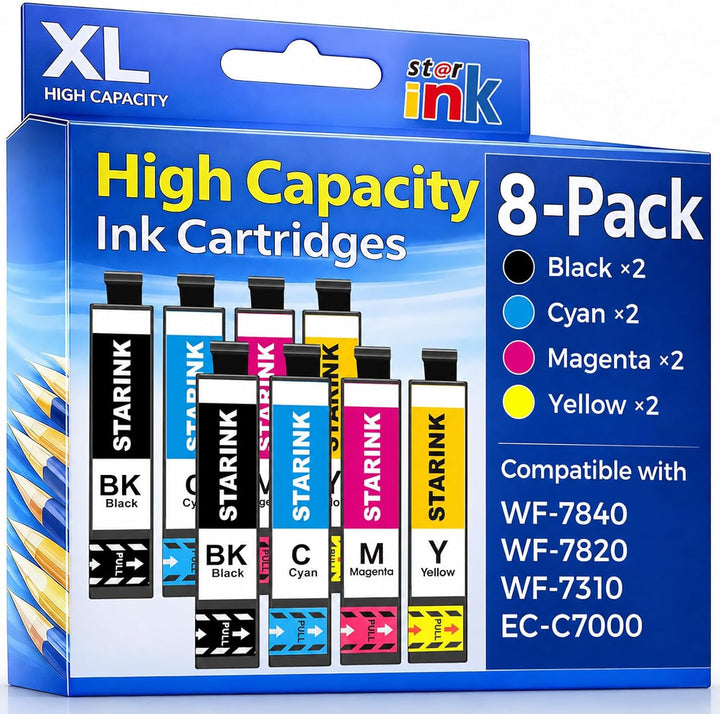
The Epson WorkForce Pro WF-7840 uses Epson 812 standard-capacity and 812XL high-capacity ink cartridges. Starink offers remanufactured Epson 812XL in an 8-Pack with two Black, two Cyan, two Magenta, and two Yellow cartridges. Each cartridge yields up to 1,100 pages individually, with a pre-installed OEM chip.

Shop Epson 812XL Ink for the WorkForce Pro WF-7840

Complete 8-PackOEM Chip IncludedRemanufactured

Starink Remanufactured Epson 812XL Ink Cartridges 8-Pack

Includes two Black, two Cyan, two Magenta, and two Yellow cartridges. Each yields up to 1,100 pages per individual cartridge; actual output varies. OEM chips are pre-installed, so no chip transfer is required.

$49.99 USD$6.25 USD per cartridgeIn Stock
Subscribe & Save 15% on Your First Order

Epson 812XL Ink Cartridge Compatibility

The Starink remanufactured Epson 812XL 8-Pack fits the Epson WorkForce Pro WF-7310, WF-7820, WF-7840, and WorkForce EC-C7000. Check the complete model name on your printer before ordering.

Check the complete printer model and cartridge number before ordering. Epson printer names identify compatibility. Starink is an independent remanufactured-cartridge brand and is not affiliated with Epson.

Epson 812 Cartridge Family for the WF-7840

The WF-7840 uses Epson 812 standard-capacity or Epson 812XL high-capacity ink. Starink offers the remanufactured Epson 812XL 8-Pack for this model.

Epson also offers a separate 812XXL extra-high-capacity Black cartridge. The Starink 8-Pack on this page contains 812XL cartridges, not 812XXL. Epson 822XL is a different cartridge family and is not interchangeable with 812XL.

Epson 812XL Page Yields for the WF-7840

These Starink replacement-cartridge ratings apply to each individual cartridge:

CartridgePage Yield
Epson 812XL BlackUp to 1,100 pages each
Epson 812XL CyanUp to 1,100 pages each
Epson 812XL MagentaUp to 1,100 pages each
Epson 812XL YellowUp to 1,100 pages each

Page yields are per individual cartridge, not a combined 8-Pack yield. Actual output varies with page content, settings, print frequency, and maintenance cycles.

What's in the Epson 812XL 8-Pack?

  • 2 × Remanufactured Epson 812XL Black
  • 2 × Remanufactured Epson 812XL Cyan
  • 2 × Remanufactured Epson 812XL Magenta
  • 2 × Remanufactured Epson 812XL Yellow

Two complete Black, Cyan, Magenta, and Yellow replacement sets. Each cartridge has a pre-installed OEM chip. Replace individual colors in their matching slots.

Epson 812 vs. 812XL vs. 812XXL

CartridgeCapacityStarink 8-Pack
Epson 812StandardNot included
Epson 812XLHighEight 812XL cartridges
Epson 812XXLExtra-high-capacity BlackNot included

Choose by the cartridge family printed on the product listing. Starink's featured product is remanufactured 812XL.

Starink Epson 812XL vs. Original Epson and Other Replacement Ink

What MattersStarink Epson 812XL Ready to InstallOriginal Epson 812XLOther Replacement Options
Product TypeRemanufactured ink cartridgesNew OEM ink cartridgesVaries by listing
Chip DescriptionOEM Chip Included; pre-installedOriginal Epson chipCheck the listing
Chip TransferNo transfer requiredNo transfer requiredMay vary
Page Yield Shown HereBlack, Cyan, Magenta, and Yellow each up to 1,100 pages per cartridgeCheck the current Epson listingCheck the seller’s stated yield
Customer ReviewsProduct reviews are currently unavailable.Varies by retailer and listingVaries by brand, seller, and listing

Check exact WF-7840 compatibility, contents, chip description, and per-cartridge yield on each listing. Actual output varies.

OEM Chip Included

Each Starink remanufactured Epson 812XL cartridge has a pre-installed OEM chip. No chip transfer from an empty cartridge is required.

The chip is intended to support communication with the listed compatible Epson printers. Recognition on every firmware version is not guaranteed.

What Does Remanufactured Epson 812XL Mean?

A remanufactured cartridge is a previously used cartridge prepared for reuse and refilled with ink. This Starink 812XL 8-Pack is a replacement product, not a new Original Epson ink set.

Why Choose Starink Epson 812XL for the WF-7840?

Complete 8-Pack

Two Black, two Cyan, two Magenta, and two Yellow cartridges.

OEM Chip Included

A chip is already installed on each remanufactured cartridge.

Up to 1,100 Pages Each

The stated yield applies to each cartridge individually.

Ink for WF-7840 Wide-Format Office Printing

The WF-7840 uses Epson 812XL ink for frequent wide-format office printing, including multi-page documents, reports, and presentations. The printer and its paper settings determine the supported output size.

Business Documents

  • Multi-page reports
  • Office documents and forms
  • Presentation materials

Large Color Materials

  • Business graphics
  • Wide-format color charts
  • Oversized office output

Installing Epson 812XL Ink in the WF-7840

Quick Replacement Steps

  1. Confirm that your printer is an Epson WorkForce Pro WF-7840 and the cartridge is Epson 812XL.
  2. Follow the printer’s replacement prompts and open the cartridge access area.
  3. Remove the cartridge being replaced.
  4. Remove the specified protective material from the matching replacement color. Avoid touching chip contacts or the ink outlet.
  5. Insert the cartridge securely into its matching color slot.
  6. Allow recognition to finish and run a test print if needed.

If a Cartridge Is Not Recognized

Recheck the exact printer model, cartridge number, protective material, matching color slot, and seating. Record the warning and whether it appeared after a firmware update.

WF-7840 Firmware Update Settings

Turning off automatic firmware updates is not required before installing the Starink 812XL 8-Pack. If you want to review available update settings, see the supporting guide. An OEM chip does not guarantee recognition on every firmware version.

See All Epson 812XL Compatible Printers

Compare the four exact Epson 812XL printer models, cartridge capacities, 8-Pack contents, and individual page yields in the complete guide.

Epson WorkForce Pro WF-7840 Ink Cartridge FAQs

What ink does the Epson WorkForce Pro WF-7840 use?

The Epson WorkForce Pro WF-7840 uses Epson 812 standard-capacity or Epson 812XL high-capacity cartridges. Starink offers a remanufactured Epson 812XL 8-Pack for this printer.

Is the Starink Epson 812XL 8-Pack compatible with the WF-7840?

Yes. The Starink remanufactured Epson 812XL 8-Pack is compatible with the Epson WorkForce Pro WF-7840. Confirm the complete printer model and cartridge family before ordering.

What is included in the Epson 812XL 8-Pack?

The pack contains two Black, two Cyan, two Magenta, and two Yellow cartridges. It provides two complete four-color replacement sets.

Why are there two cartridges of each color?

The 8-Pack includes two complete Black, Cyan, Magenta, and Yellow sets. You can install a set and keep the other cartridges for later replacement.

How many pages does each Starink Epson 812XL cartridge yield?

Each Starink Epson 812XL Black, Cyan, Magenta, and Yellow cartridge yields up to 1,100 pages per individual cartridge. Actual output varies with use.

Is 1,100 pages the yield for the whole 8-Pack?

No. The up-to-1,100-page yield applies to each individual cartridge. It is not a combined 8-Pack page yield.

What is the difference between Epson 812 and 812XL?

Epson 812 is the standard-capacity family; Epson 812XL is high capacity. The Starink product on this page is remanufactured Epson 812XL.

Is Epson 812XXL Black included in this 8-Pack?

No. Epson 812XXL is a separate extra-high-capacity Black cartridge. This Starink 8-Pack includes Epson 812XL Black and color cartridges.

Are Epson 812XL and 822XL interchangeable?

No. Epson 812XL and 822XL are different cartridge families. The WF-7840 uses Epson 812 or 812XL cartridges, not Epson 822XL.

Can I use Epson 812XL for wide-format printing on the WF-7840?

Yes. The WF-7840 supports wide-format office printing and uses Epson 812XL ink. The printer and its paper settings determine the supported print size.

Are these Epson 812XL cartridges remanufactured?

Yes. The Starink Epson 812XL 8-Pack contains remanufactured replacement cartridges made from previously used cartridges. They are not new Original Epson cartridges.

Do these Epson 812XL cartridges include OEM chips?

Yes. Each Starink remanufactured Epson 812XL cartridge includes a pre-installed OEM chip. No chip transfer is required.

Can I replace individual colors in the WF-7840?

Yes. Black, Cyan, Magenta, and Yellow are separate cartridges. Replace the needed cartridge in its matching color slot.

Which other printers use this Starink Epson 812XL 8-Pack?

In addition to the WF-7840, the pack is compatible with Epson WorkForce Pro WF-7310, WF-7820, and WorkForce EC-C7000. Check the exact model before ordering.

How do I install Epson 812XL cartridges in the WF-7840?

Follow the printer’s replacement prompts, remove the old cartridge, prepare the matching Epson 812XL color, and insert it securely. Let recognition finish and see the Installation Guide for details.

What if the WF-7840 does not recognize a cartridge?

Check the printer model, 812XL cartridge number, protective material, color slot, and seating. Record the message and see the Epson recognition guide.

Must I disable firmware updates before installing Starink 812XL?

No. Disabling automatic firmware updates is not a required installation step. See the firmware settings guide if you want to review update options.

Ready to Shop Epson 812XL Ink for Your WF-7840?
Two complete Black, Cyan, Magenta, and Yellow sets. OEM Chip Included.
Shop Epson 812XL 8-Pack

Compare products

Select 2 or 3 items to compare

Select first item to compare

Select second item to compare

Select third item to compare

Compare